Setup Guide
Set up your headphones
Five minutes from box to first session. Works for AONIC Flow 2.0, Swim 2.0 and Surf 2.0 — the hardware is identical.
Read this before you get in the water
Bluetooth does not work underwater. This is physics, not a fault — the signal will not travel through water. For swimming, surfing and any water session, load music onto the built-in 32 GB storage and switch to MP3 mode. Step 4 below shows you how.
What’s in the box
- AONIC Flow headphones
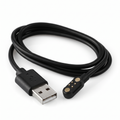
- Magnetic charging cable
- Elastic anti-slip band
- Neck safety leash
- User manual
For water sports, use both the elastic anti-slip band and the neck safety leash. The band tightens the fit; the leash stops you losing them in a wipeout.
Four steps to your first session
Charge them fully
Attach the magnetic charging cable to the contacts on the headphone arm. A full charge takes about 2.5 hours and gives you roughly 10 hours of playback.
Red light = charging. Solid white light = fully charged. The headphones switch themselves off while charging — that is normal, not a fault.
Use a standard 5V charger rated at 0.5A maximum. Do not use a fast charger.
Power on
Hold the power button for 3 seconds to switch on. Hold it for 5 seconds to switch off.
When the battery gets low you will hear a “DuDu” alert and the red light will flash once per second.
Pair with your phone
Power on. The headphones enter pairing mode automatically the first time. Open Settings → Bluetooth on your phone and select the AONIC device from the list.
They reconnect automatically from then on. Pair on dry land before you paddle out.
Not pairing? With the headphones on and in Bluetooth mode, press the power button 5 times. The red light flashes three times with a beep, and the device resets and re-enters pairing mode.
Load music for water use Do this before you swim
Connect the headphones to a computer with the charging/data cable. They appear as a storage drive. Drag your music files across, eject safely, and disconnect.
Supported formats: MP3, WAV, FLAC, APE, WMA. 32 GB holds around 6,000 songs.
To play them, double-click the power button to switch from Bluetooth to MP3 mode.
The voice prompt calls this “TF card mode”. TF card mode and MP3 mode are the same thing.
Bluetooth mode vs MP3 mode
Bluetooth mode
- Land, gym, running
- Travel and commuting
- Casual listening
- Calls and voice assistant
MP3 mode — for water
- Swimming
- Surfing and kitesurfing
- Any full immersion
- Phone stays on the beach
Double-click the power button to switch between them.
Button controls
| Action | Control |
|---|---|
| Power on | Hold power button 3 seconds |
| Power off | Hold power button 5 seconds |
| Play / pause | Short press power button |
| Volume up / down | Press + or − |
| Next / previous track | Double-click + or − |
| Switch Bluetooth / MP3 mode | Double-click power button |
| Shuffle mode | Hold + for 2 seconds |
| Voice assistant (Bluetooth mode) | Hold − for 2 seconds; hold again to exit |
| Answer / end call | Short press power button |
| Decline call | Hold + for 2 seconds |
| Factory reset | Press power button 5 times while on in Bluetooth mode |
Getting a secure fit
Everyday use: wear them comfortably around the ears — no accessories needed.
Action sports (surfing, kitesurfing, wingfoiling, wakeboarding, running): fit the elastic anti-slip band. Place the elastic under the headphone frame, stretch the round tip toward the hole, pull it through until the ball tip locks, then repeat on the other side. The frame should sit inside the loop and the elastic should run across the back of the headphones.
Water sports: add the neck safety leash. Loop it around the back section of the headphone frame, feed it back through itself, and wear it around your neck before you enter the water.
Attach the leash to the headphone frame only — never to the elastic anti-slip band.
After every salt-water session
This 60-second routine is the single biggest factor in how long your headphones last. Salt left on the magnetic charging port corrodes the contacts.
- Rinse the headphones with fresh water.
- Rinse the magnetic charging port specifically.
- Shake off the excess water.
- Dry with a clean towel.
- Let them air dry fully before charging.
Never charge while wet
Salt or water on the magnetic charging port during charging causes corrosion and charging failure. This is the most common cause of preventable damage.
Also: do not store them wet, do not expose them to extreme heat, do not use harsh chemicals, and do not disassemble them.
Troubleshooting
Bluetooth cuts out in the water
Expected behaviour. Bluetooth cannot travel through water. Switch to MP3 mode with a double-click of the power button.
They won’t charge
Rinse and thoroughly dry the magnetic charging port, then make sure it is completely dry before reconnecting the cable. Check you are using a 5V / 0.5A charger, not a fast charger.
They won’t pair, or keep dropping
Factory reset: with the headphones on and in Bluetooth mode, press the power button 5 times. The red light flashes three times with a beep and pairing mode restarts. Remove the old entry from your phone’s Bluetooth list first.
The fit feels loose
Fit the elastic anti-slip band. For water sessions, add the neck safety leash too.
I’m worried about losing them
Always wear the neck safety leash for high-impact water sports.
Specifications
| Waterproof rating | IPX8 — fully submersible |
| Memory | 32 GB built-in |
| Battery | 180 mAh · approx. 10 hours playback |
| Charging time | Approx. 2.5 hours · 5V input, magnetic port |
| Driver unit | 16 mm bone conduction |
| Frequency response | 20 Hz – 20 kHz |
| Speaker sensitivity | 88 ± 3 dB · 8Ω impedance |
| Bluetooth profiles | A2DP / AVRCP / AVDTP · range over 10 m |
| Chipset | BT8922 |
| Dimensions & weight | 135 × 112 × 45 mm · 34 g |
| Material | ABS + PC with titanium frame |
Still need help?
For warranty support, replacement requests or anything not covered above, get in touch and include your order number.
AONIC Flow includes warranty support for eligible product faults. Damage caused by misuse, improper charging, salt corrosion from lack of rinsing, or loss may not be covered unless protected by an active AONIC Care+ plan.
Email support@aonicflow.com